
 |
MULTIPLAYER GAMES |
|
CONTENTS
The
Multiplayer Contact list contains contact information of other 3d Reversi
Deluxe players who wish to play multiplayer games also.
Either add your own contact information to the list, or email other people in the list, or both, and arrange a time to play over email.
Note that Windows users can only connect with other Windows Users, and Mac OS X Users can only connect with other Mac OS X users - mixing platforms (i.e. a multiplayer game between a Windows Users and a Mac OS X user) is not possible.
1) Decide on who will create the game
One player must create the game, and the other player will join the created game. You must decide who will do what (and let each other know). It makes no difference to the actual game itself who creates or joins it.
2) Computer Identification
In the steps below, you can use either an IP address or a Computer Name, in combination with a Port Number to setup a connection between two computers. This section explains when to use the IP Address and when to use the Computer Name.
-
If setting up an multiplayer connection over the internet, use the IP Address in the steps below.
-
If setting up a game over a local network, then you can use either the IP Address or the Computer Name - you may have more success with one of these depending on how the network is setup.
-
If setting up a game over two computers directly connected together by a cable you should use the Computer Name. Two connect two computers together in this way.
(Windows Users may need to install the Direct Cable Connection component of Windows. See your Windows CD for more information on this.)
The Port Number must be the same for both computers, regardless of the connection type.
4a) Setting up the game [For the person creating the game]
Before creating the game, you must give either your IP address or Computer Name (see above) and your Port Number to the other player. These items are shown in the game after you press the "Create" button, as shown in the picture below.
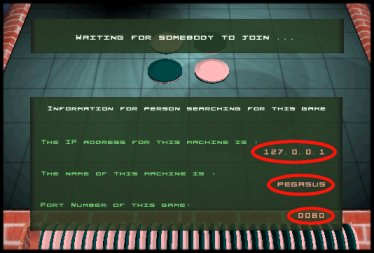
After you create the game, let your opponent know, and then he/she can enter the information you have given him/her and start to search for your created game.
After your opponent has successfully found your game, the game will change to the Multiplayer Pre-Game menu automatically.
4b) Setting up the game [For the person joining the game]
Before joining he game, you will need your opponents IP address or Computer name (see above) and his/her Port Number. When you get these from your opponent, and are sure your opponent has created the game, enter these into the multiplayer menu of 3d Reversi Deluxe and press the required "Search" button.
If all goes OK, a connection should be created, and both players should enter the Multiplayer Pre-Game menu of the game.